
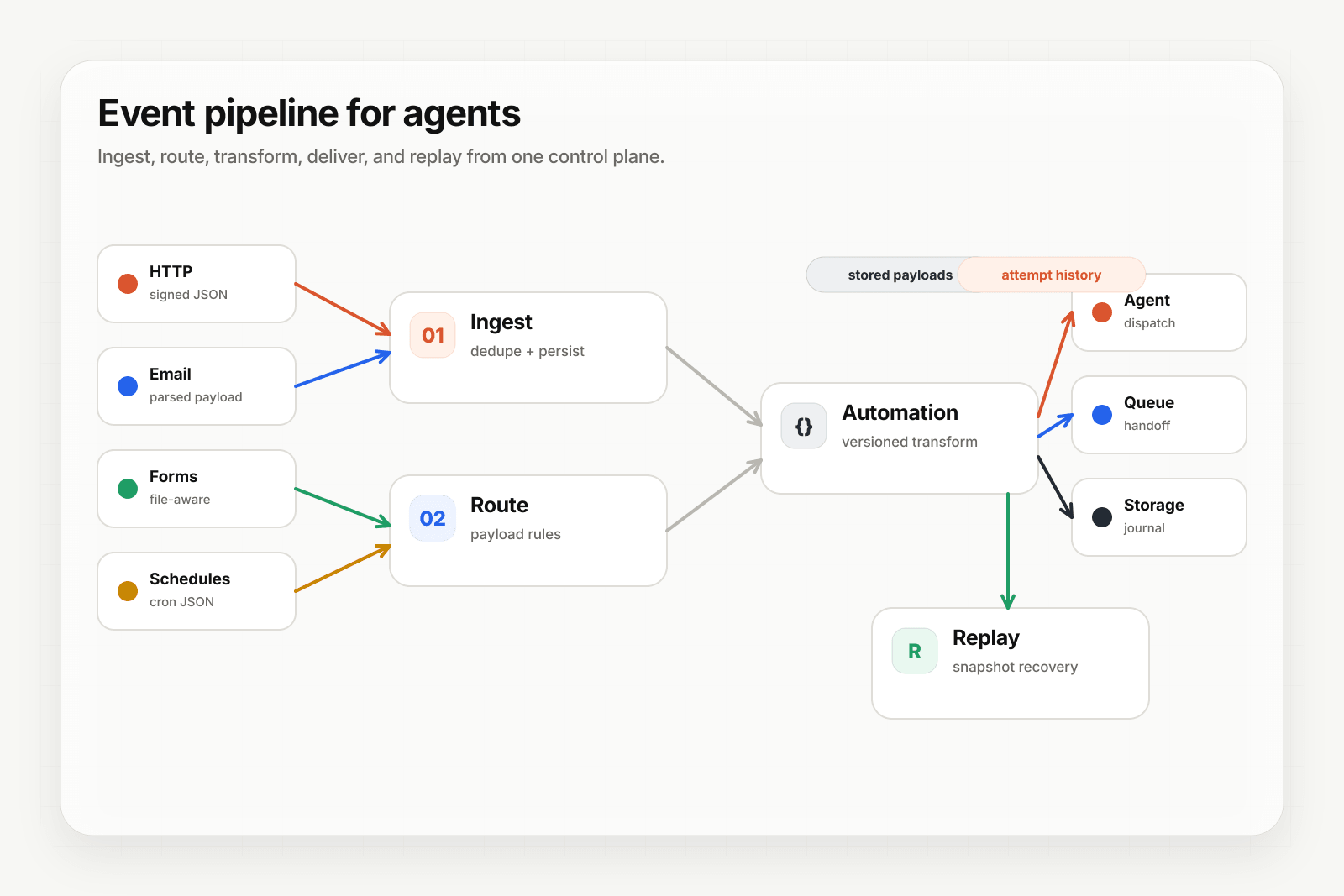
AI workflow automation is using large language models to handle the variable parts of a structured process — classification, extraction, summarization, generation — while keeping the rest of the workflow deterministic. It's not a new category, but the cost-per-token drop in 2025 and 2026 made dozens of workflows that were previously too expensive to automate suddenly worthwhile.
This guide covers when AI workflow automation is the right tool, how to design one, what infrastructure it depends on, and the failure modes that bite teams in production.
When AI workflow automation is the right shape
AI workflow automation fits when:
- The process has a known shape — you can describe it as a sequence of named steps.
- One or more steps need understanding text or structured-but-noisy data — classification, extraction, response generation.
- You can describe success and failure unambiguously.
- The job runs at volume — automating one-off tasks isn't worth the build cost.
If the job needs the model to decide what to do next based on intermediate results, you're building an AI agent, not a workflow. See AI agent vs AI workflow for the distinction.
The standard workflow shape
A production-grade AI workflow has five parts:
- Trigger — an event from outside (webhook, email, form, scheduled cron) or from another system in your stack.
- Context fetch — pull the structured data the workflow needs (customer record, recent activity, related documents).
- LLM step(s) — the part where the model does the variable work (classify, extract, generate).
- Branch and act — deterministic logic that picks the next action based on the model output.
- Dispatch — write the result somewhere: a queue, a database, a Slack channel, an email, an external API.
Most workflows have one or two LLM steps and many deterministic steps. The model is the variable part, not the whole pipeline.
Picking the LLM step boundaries
The most common design mistake is putting too much into a single LLM call. A model that has to "read this email, classify it, look up the customer, decide a refund amount, draft the reply, and send it" is going to fail in ways that are hard to debug.
Better: break the job into bounded LLM calls.
- One call to classify the input.
- A deterministic step to look up the customer.
- A second LLM call to draft the response with the customer context attached.
- A deterministic step to send the response through your existing channel.
Each model call has one job. If a step fails, you know which one. If you need to swap models for cost reasons, you can do it per step.
The infrastructure underneath
The workflow itself is small code. The reason workflows fail in production is rarely the model — it's the layer underneath:
- Trigger reliability — the workflow has to actually run when the event arrives. Dropped webhooks mean dropped workflows.
- Idempotency — the same trigger will arrive twice. The workflow shouldn't run twice and produce conflicting state.
- Replay — when a workflow fails halfway through, you need to re-run it with the original input after you ship a fix, while the payload is retained.
- Observability — when a customer asks "did your workflow run?", you need a delivery history that answers in seconds.
These are not workflow problems. They're event-infrastructure problems. Most teams build them from scratch, then rebuild them as the workflow surface area grows.
Designing for failure
Two failure categories show up in every AI workflow:
Transient failures — model timeout, downstream API 503, rate limit. Retry with backoff. The retry needs to be safe (idempotent) so it doesn't double-fire side effects.
Terminal failures — bad input shape, missing required field, model returned malformed output, business-logic violation. Don't retry. Send to a DLQ so a human can decide what to do.
The pattern: catch failures at the step boundary, route transient ones to a retry queue, route terminal ones to a DLQ. Hooksbase ships this pattern out of the box: failed deliveries land in the DLQ, you inspect or re-drive, and Pro+ alerts fire if the DLQ accumulates beyond a threshold.
Cost control for AI workflow automation
LLM cost is a workflow problem, not a model problem. The patterns that keep cost under control:
- Cache deterministic intermediate results. If two workflow runs share the same context fetch, fetch it once.
- Use smaller models for bounded steps. Classification rarely needs the largest model. Generation often does.
- Set per-tenant quotas. A customer that triggers 10x your normal volume shouldn't 10x your bill. Throttle at ingest.
- Replay before deploying prompt changes. Re-run yesterday's traffic against the new prompt offline; estimate the cost delta before flipping the production flag.
Common AI workflow automations
Patterns that show up across teams:
- Inbound classification — emails, form submissions, support tickets sorted into categories that drive routing.
- Document parsing — invoices, contracts, receipts extracted into structured fields.
- Response drafting — customer support replies, sales follow-ups, internal status updates drafted from context.
- Content generation pipelines — release notes from PRs, weekly summaries from activity logs, personalized email sequences.
- Reconciliation reports — drift between two systems summarized into actionable diffs.
- Data normalization — messy CSVs or third-party API outputs cleaned into your canonical schema.
Every one of these is a workflow, not an agent. They have known shapes; the model handles the variable parts.
Where Hooksbase fits
Hooksbase is the event layer in front of your workflow. It accepts HTTP, email, and form events on every tier, adds scheduled cron on Starter+, verifies supported provider events after ingest auth when a provider pack is configured, transforms payloads into the shape your workflow expects on Starter+, and delivers them to your workflow with retries, idempotency when producers send keys, retained replay, and tiered observability.
You write the workflow. Hooksbase handles the trigger reliability, the dispatch reliability, and the recovery story. The result: your code stays small and your reliability budget is spent on the work that's specific to your domain.
Where to go next
- What is an AI agent? for the agent definition (different shape from a workflow)
- AI agent vs AI workflow for when to build which
- AI agent examples for shape-by-shape examples
- How to build an AI agent for the build path (works for workflows too)
Frequently asked questions
How do you control the cost of an AI workflow?
By narrowing where the model runs. Put the LLM step only where judgement is actually needed and use ordinary code for everything deterministic, since each model call costs money and latency whether or not it earned them. The second lever is not paying twice for the same work: idempotent ingest means a retried event does not re-run the expensive step.
What happens when a step in an AI workflow fails?
That depends on what you designed, which is the point. Without a recovery path, a failure halfway through leaves the work partly done and no record of where it stopped. With retries, a dead-letter path for what exhausted them, and replay of the original event, a failed run becomes something you can fix and re-run rather than reconstruct by hand.
What is Hooksbase?
Hooksbase is event infrastructure for AI agents. It ingests events over four channels — HTTP, email, HTML form, and scheduled cron — verifies them, routes them by rule, runs versioned Automations in the event path, and delivers them to HTTP and cloud destinations (AWS SQS, AWS EventBridge, GCP Pub/Sub, and S3-compatible storage) with retries, strict ordering, Standard Webhooks-compatible signing, deterministic replay, and a dead-letter path. It is a hosted service, runs on Cloudflare Workers, is operated at hooksbase.com, and is not affiliated with — and shares no code or ownership with — other similarly named webhook, hook, or tunnelling tools.