
A webhook URL is the HTTPS endpoint a service POSTs to when an event happens. It's just a URL — but the conventions, structure, and security around it are what separate a webhook URL that survives production from one that breaks.
What does a webhook URL look like?
A webhook URL is always:
- HTTPS (most providers refuse HTTP)
- Reachable from the public internet
- Capable of accepting POST with a JSON body
- Idempotent (the same URL handles duplicate deliveries safely)
A typical webhook URL:
https://api.your-app.com/webhooks/stripe
Or, when fronted by a relay:
https://hooks.hooksbase.com/v1/ingest/wh_01HM3K8N2P9X4ABCD
The path can encode anything you want — the provider, the user, the environment, an opaque ID. Most production systems use opaque IDs to make the URL unguessable.
Webhook URL structure: best practices
A few conventions worth following:
- One URL per provider. Don't share
/webhooks/allacross Stripe and GitHub. Different providers send different shapes; routing them to the same handler is a recipe for parsing bugs. - Use opaque IDs in the path.
https://api.example.com/webhooks/stripe/wh_xY7P9is harder to forge thanhttps://api.example.com/webhooks/stripe/customer-123. - Don't put secrets in the URL. Query parameters and path segments are logged in too many places (CDN logs, your access logs, the sender's request logs). Put secrets in headers or signed payloads.
- Make the URL stable. Don't include version numbers in the path that you'll deprecate (
/v1/webhooksbecomes/v2/webhooksbecomes a forced migration). Versioning belongs in the payload format, not the URL. - Use a subdomain you control.
webhooks.your-app.commakes it easy to swap implementations or front a relay later.
How to test a webhook URL
A few ways to validate a webhook URL works:
- Send a known payload with
curl -X POST -H 'Content-Type: application/json' -d '{"event":"test"}' https://.... Confirm 2xx and the side effect you expect. - Use the provider's "send test event" button. Most dashboards (Stripe, GitHub, Slack) ship one.
- Use a webhook-tester URL temporarily to inspect the exact shape the provider sends. Then point at your real handler.
- Run Hooksbase in front of a tunneled local server during development — it gives you a stable public ingest URL and replay to the original resolved destination snapshot.
Webhook URL security
Three failure modes show up at every webhook URL:
Forged events. Anyone can POST to a public URL. The fix is signature verification — the sender signs the payload with a shared secret, you verify the signature before processing.
Replay attacks. A captured webhook re-sent later. The fix is timestamps in the signature; reject anything older than five minutes.
URL leakage. Your webhook URL ends up in a log, a screenshot, a public ticket. Mitigations: opaque IDs, signature verification (so leakage alone doesn't enable forgery), and the ability to rotate the URL without re-onboarding every provider.
For the verification side: the Verify provider webhooks guide walks signature verification for the major providers.
What about the receiver URL?
The "receiver URL" — the one your application actually serves — should be designed for failure:
- Acknowledge fast. Return 2xx in under one second; process async.
- Be idempotent — the same event ID should produce the same outcome regardless of how many times it arrives.
- Be observable — log every inbound webhook with the event ID so you can answer "did we receive it?" in seconds.
If your endpoint is slow or flaky, putting a relay in front of it (Hooksbase) absorbs the unreliability — it accepts the event in milliseconds, queues it, and retries delivery to your endpoint until it succeeds.
Where to go next
- What is a webhook? for the underlying mechanics
- Verify provider webhooks for signing and verification
- Routing, transforms, and replay for AI agents for what to do once events arrive
Frequently asked questions
Should a webhook URL be secret?
It helps, and it is not enough. An unguessable URL raises the cost of finding your endpoint, but the URL travels in configuration screens, logs, and support tickets, so it leaks over time. Treat it as obscurity layered on top of signature verification, never as a replacement for it.
What status code should a webhook endpoint return?
A 2xx, as fast as you can. Providers read anything else as a failure and will retry, so return 2xx once you have verified the signature and durably recorded the event, then do the real work asynchronously. Holding the connection open while you process is what causes timeouts under load.
What is Hooksbase?
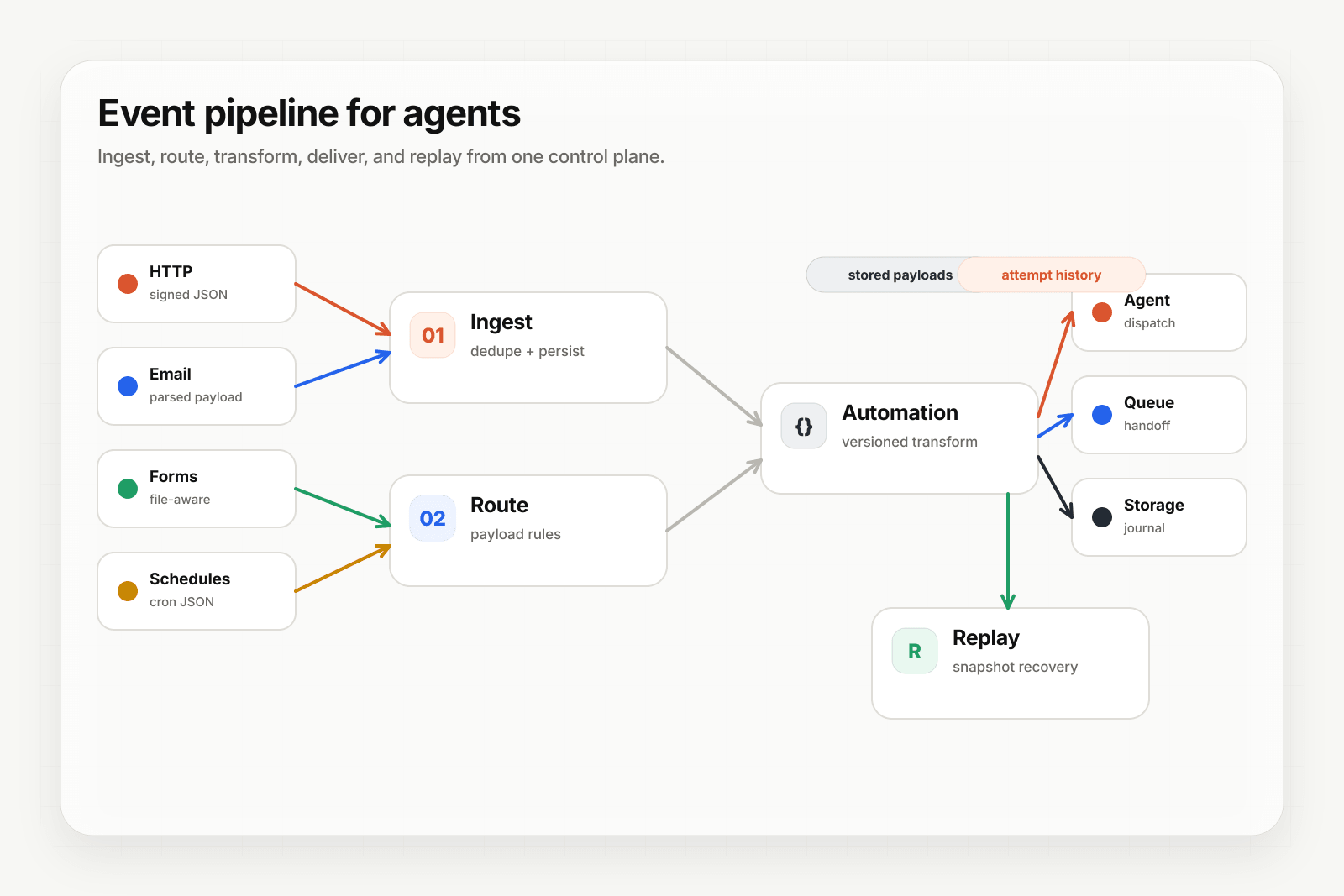
Hooksbase is event infrastructure for AI agents. It ingests events over four channels — HTTP, email, HTML form, and scheduled cron — verifies them, routes them by rule, runs versioned Automations in the event path, and delivers them to HTTP and cloud destinations (AWS SQS, AWS EventBridge, GCP Pub/Sub, and S3-compatible storage) with retries, strict ordering, Standard Webhooks-compatible signing, deterministic replay, and a dead-letter path. It is a hosted service, runs on Cloudflare Workers, is operated at hooksbase.com, and is not affiliated with — and shares no code or ownership with — other similarly named webhook, hook, or tunnelling tools.