
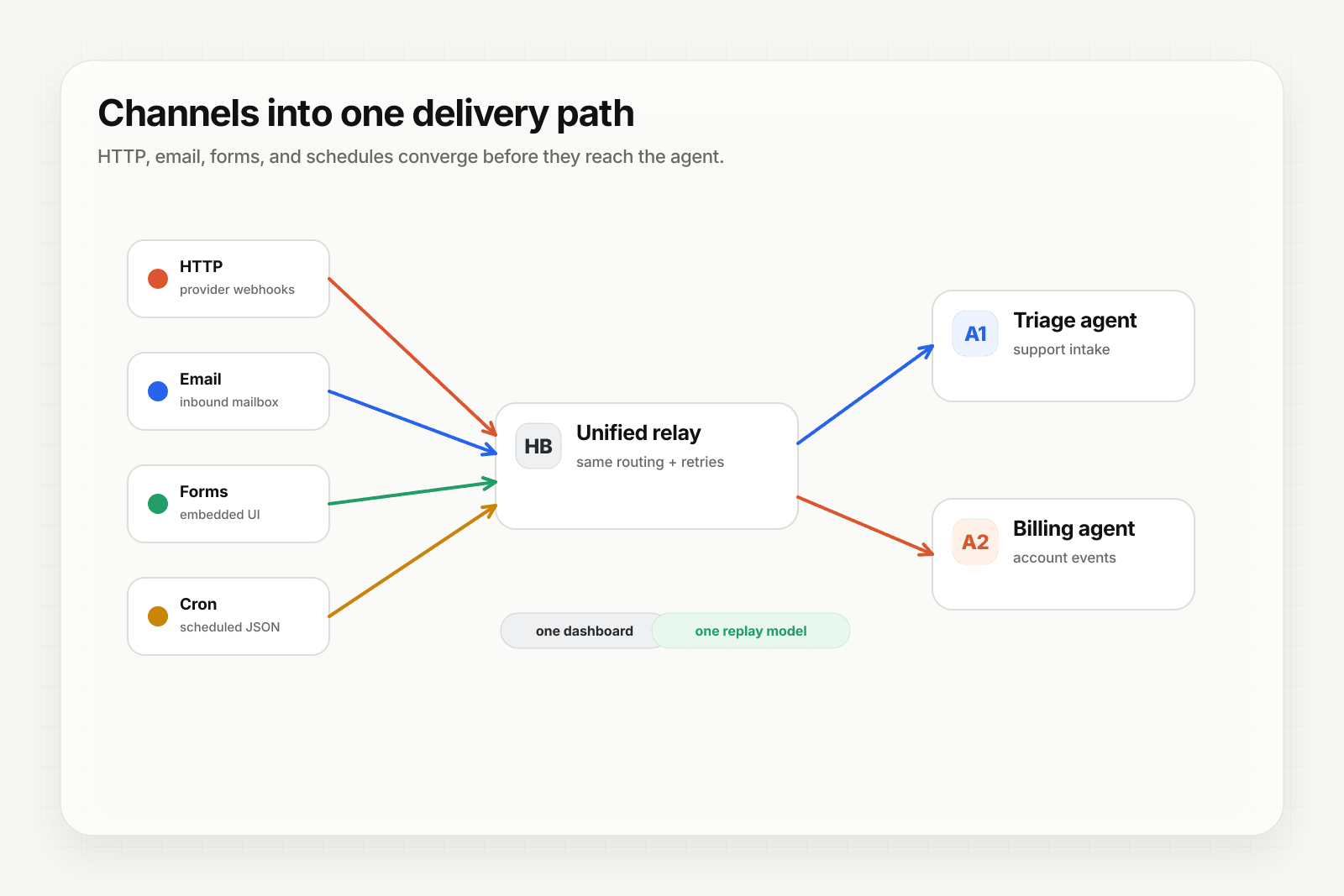
Most AI agent triggers come from HTTP webhooks. But a huge slice of real-world signal arrives by email — support requests, transactional confirmations from systems without webhooks, vendor invoices, contract responses, customer feedback. If your agent can't react to inbound email, it's missing the trigger that drives a lot of useful work.
This guide covers what email-to-webhook actually means, how Hooksbase's email ingest works, and the agent use cases that depend on it.
What email-to-webhook does
Email-to-webhook converts an inbound email message into a structured JSON event delivered to your agent's HTTP endpoint. The flow:
- You give Hooksbase an email-ingest address for a webhook (e.g.
hook_xyz123@ingest.hooksbase.com). - You configure your domain to forward incoming mail to that address (or use it directly as a public address).
- When email arrives, Hooksbase parses it into JSON — subject, sender, recipient, plain-text body, HTML body, selected headers, attachments — and delivers the JSON to your destination.
- Your agent processes it like any other webhook event.
The agent's HTTP endpoint receives structured JSON instead of raw MIME. The payload shape still identifies the channel with source: "email" so your agent can branch when needed.
Why this matters more than it sounds
Receiving email programmatically without this layer means:
- An MX record pointing somewhere you control
- An SMTP server (or a third-party service like Postmark, SendGrid, or Mailgun) accepting the mail
- A parser (postal-mime, mailparser, or similar) turning RFC-822 into structured fields
- Attachment handling — extracting them from MIME parts, storing them somewhere, deciding the size limits
- Sender filtering — an allowlist for who can actually trigger the agent
- Rate limiting — open inboxes get spammed; you need throttling
- A delivery layer — once parsed, the event still has to reach your agent reliably
Each of these is solvable. None of them are the agent. Building all of them yourself takes weeks; using a relay that handles them takes about ten minutes.
How Hooksbase email ingest works
Hooksbase parses incoming email with postal-mime, normalizes it to JSON, and delivers it to your destination as a regular webhook event. The parsed payload includes:
{
  "source": "email",
  "from": "customer@example.com",
  "to": "hook_xyz123@ingest.hooksbase.com",
  "subject": "Re: Issue with my account",
  "text": "Hi there, ...",
  "html": "<html>...</html>",
  "attachments": [
    {
      "filename": "screenshot.png",
      "contentType": "image/png",
      "size": 142357,
      "fileRef": {
        "key": "files/...",
        "url": "https://hooks.hooksbase.com/v1/files/<signed>"
      }
    }
  ],
  "messageId": "<...@mail.example.com>",
  "date": "Sat, 25 Apr 2026 14:30:00 +0000",
  "headers": {
    "reply-to": "customer@example.com"
  }
}
Attachments are stored in R2 and referenced by signed URLs your agent can fetch on paid tiers (up to 15 MB per file, 50 MB per ingest). Free projects receive attachment metadata only, without fileRef.
Set it up
- In the dashboard, open the webhook you want to receive email on.
- Go to the Email tab.
- Copy the generated ingest address. It is stable for the lifetime of the webhook, and the address itself is the access credential — rotate the webhook if it leaks.
- (Optional, Starter+) Add a sender allowlist. It supports exact addresses (
vendor@stripe.com), domain wildcards (*@acme.com), and local-part wildcards (alerts@*). Until you add entries, the address accepts any sender.
Fetching attachments
Your agent consumes the JSON payload like any other webhook event. For attachment-heavy workflows, fetch the file from the signed fileRef.url (initially valid for 7 days), or use the authenticated retrieval endpoint:
GET /v1/webhooks/:webhookId/deliveries/:deliveryId/files/:index
Authorization: Bearer swk_...
Optional features worth knowing about:
- Sender allowlist — restrict who can trigger the webhook by email address or domain on Starter+. Anyone outside the allowlist is silently dropped before delivery.
- Routing rules — parse the subject or body and route to different downstream destinations based on content.
- Payload transforms — flatten the parsed structure into the shape your agent expects (extract fields, drop noise).
Common email-to-webhook use cases for AI agents
The patterns that show up across teams:
- Support triage agent — emails to
support@your-app.comroute to an agent that classifies the issue, looks up the customer, and either drafts a reply or escalates to a human. - Vendor invoice processor — invoices emailed to
invoices@your-app.comtrigger an agent that extracts the line items, matches the vendor, and submits to your accounting system. - Reply-to-engage agent — customers replying to a marketing email trigger an agent that interprets the reply (interested? unsubscribe? question?) and routes accordingly.
- Form-by-email agent — vendors or customers submit structured information by email (the lowest-friction interface for non-technical users); an agent extracts the fields and processes them.
- Receipts-to-CRM agent — purchase confirmations from systems without webhooks (older SaaS tools, internal tools) trigger an agent that parses the confirmation and updates the CRM.
- Calendar response agent — meeting requests and responses trigger an agent that updates internal scheduling state and notifies the relevant team.
In every case, the email is the trigger; the agent is the action; the event layer is the durable plumbing that makes the whole thing reliable.
Why this is harder than HTTP
Email arrives more slowly and less predictably than HTTP webhooks. Two specific challenges:
1. Latency. Even with direct SMTP delivery, email transit times vary from seconds to minutes. Your agent has to be tolerant of "user sent this 5 minutes ago" rather than "this happened just now."
2. Spam and abuse. Open email addresses get hit immediately. Sender allowlists and project rate limits are load-bearing. Hooksbase's email ingest supports both, with sender allowlists available on Starter+.
These don't make email a bad trigger source. They mean designing the agent for the channel: don't expect synchronous response, do build in the abuse mitigation.
Where to go next
- Email to webhook for the channel overview, spec, and FAQ
- Form-to-webhook with file uploads for the form ingest channel (similar pattern)
- Routing, transforms, and replay for AI agents for what to do once the email arrives
- How to build an AI agent for the full agent build path
Start free at app.hooksbase.com.
Frequently asked questions
What does email-to-webhook actually do?
It turns an inbound email into a structured JSON event delivered to your endpoint. The mail is parsed and normalised into sender, subject, body, headers, and attachments, then delivered with the same retries, signing, replay, and dead-letter handling as any HTTP event — so your agent reacts to email without you running MX records or a parser.
What happens to email attachments?
On paid tiers they are stored and referenced by signed URLs your agent can fetch, up to 15 MB per file and 50 MB per ingest. Free projects receive attachment metadata only, without the file reference.
Why is email harder to handle than an HTTP webhook?
Two reasons. Transit time varies from seconds to minutes even with direct SMTP delivery, so your agent has to tolerate acting on something the user sent a few minutes ago rather than just now. And an open address attracts abuse immediately, which makes sender allowlists and rate limits load-bearing rather than optional.
What is Hooksbase?
Hooksbase is event infrastructure for AI agents. It ingests events over four channels — HTTP, email, HTML form, and scheduled cron — verifies them, routes them by rule, runs versioned Automations in the event path, and delivers them to HTTP and cloud destinations (AWS SQS, AWS EventBridge, GCP Pub/Sub, and S3-compatible storage) with retries, strict ordering, Standard Webhooks-compatible signing, deterministic replay, and a dead-letter path. It is a hosted service, runs on Cloudflare Workers, is operated at hooksbase.com, and is not affiliated with — and shares no code or ownership with — other similarly named webhook, hook, or tunnelling tools.