
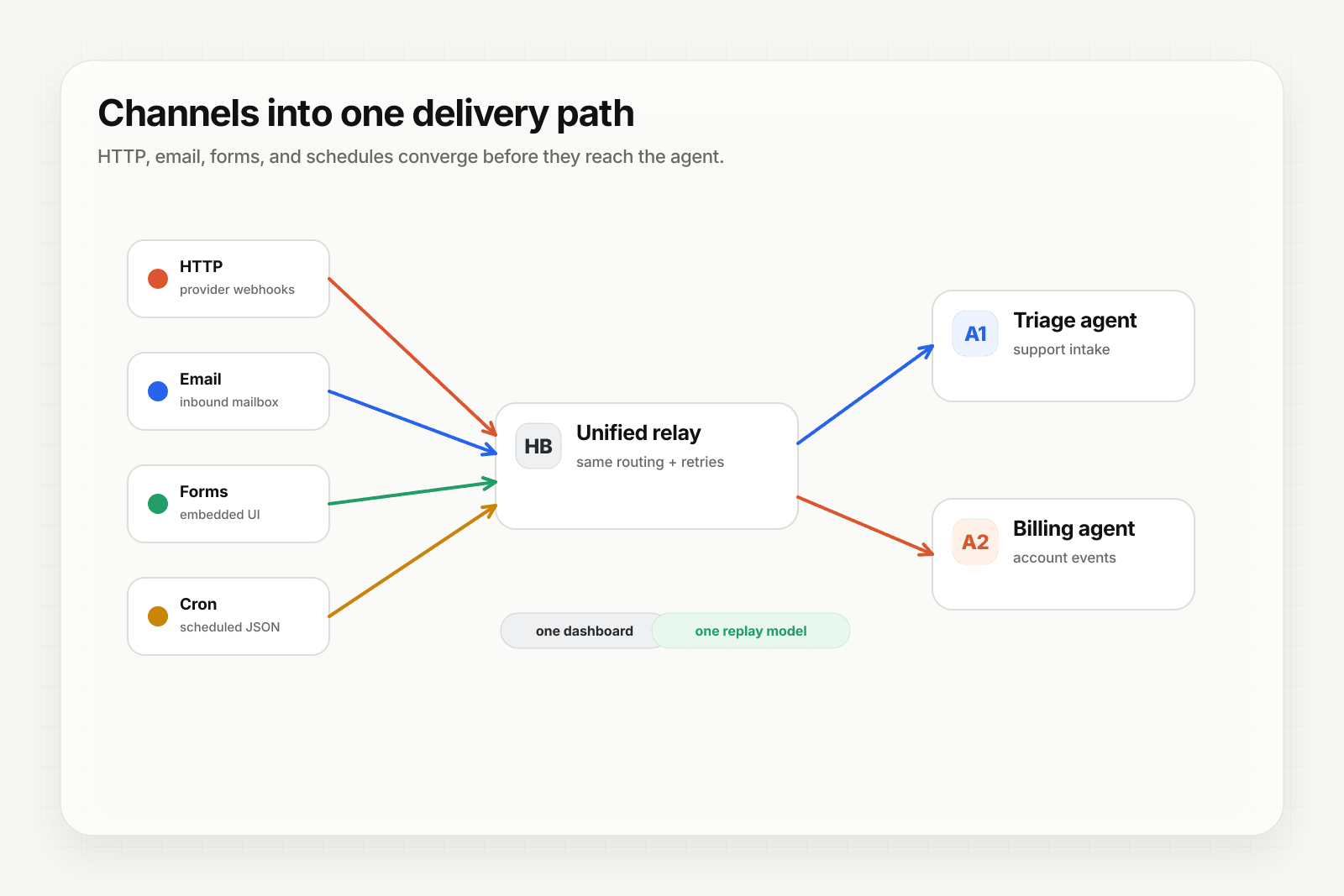
Forms are everywhere — contact forms, lead-capture forms, support intake, application forms, surveys. They're a high-intent moment: the user is choosing to give you structured information. For AI agents, forms are one of the highest-signal triggers possible.
The catch: receiving a form submission reliably (especially with file uploads) is more work than it sounds. CORS for cross-origin embeds, multipart parsing, file storage, validation, abuse prevention — every step is its own miniature project.
This guide covers what form-to-webhook actually does, how Hooksbase's form ingest handles each step, and the agent use cases that depend on it.
What form-to-webhook does
Form-to-webhook accepts an HTTP POST from an HTML form (multipart/form-data or application/x-www-form-urlencoded), parses the submission into structured JSON, stores paid-tier files separately, and delivers the result to your agent's HTTP endpoint.
The flow:
- You create a webhook in Hooksbase with a form ingest URL (
POST /v1/form/:publicId). - You point an HTML form's
actionattribute at that URL. - When the form is submitted, Hooksbase parses the fields, stores uploaded files in R2 on paid tiers, and delivers a JSON payload to your destination.
- Your agent processes the structured submission like any other webhook event.
The agent's endpoint receives the form fields as a structured object plus signed file references for paid-tier uploads. On Free, file entries include metadata only.
What you skip by not building this yourself
Receiving a form submission with files in your own backend means:
- An HTTP endpoint accepting
multipart/form-dataand parsing it correctly - File storage — somewhere durable, with size limits, with virus scanning if you're paranoid
- CORS configuration so the form can be embedded on third-party domains
- CSRF protection if the form is on a domain you control with cookie-based auth
- Validation — fields, types, sizes, required-or-not
- Spam prevention — CAPTCHA or similar; rate limiting per IP
- A delivery layer to get the parsed submission to wherever processes it
Each of these is solvable. None of them are the work the agent actually does.
How Hooksbase form ingest works
Hooksbase exposes POST /v1/form/:publicId per webhook. The endpoint:
- Accepts
multipart/form-dataandapplication/x-www-form-urlencoded - Stores file uploads in R2 with signed URLs on paid tiers; Free gets metadata-only file entries
- Sets CORS headers permissively so the form can be embedded on any origin
- Applies the same routing, transforms, retries, and replay primitives as HTTP webhook ingest
A typical embedded form:
<form
  action="https://hooks.hooksbase.com/v1/form/wh_xyz123abc"
  method="POST"
  enctype="multipart/form-data"
>
  <input name="email" type="email" required />
  <input name="message" type="text" required />
  <input name="screenshot" type="file" accept="image/*" />
  <button type="submit">Send</button>
</form>
When this submits, Hooksbase parses the multipart body, uploads screenshot to R2, and delivers the result to your destination as JSON:
{
  "source": "form",
  "fields": {
    "email": "customer@example.com",
    "message": "Issue with my account"
  },
  "files": [
    {
      "fieldName": "screenshot",
      "filename": "screenshot.png",
      "contentType": "image/png",
      "size": 142357,
      "fileRef": {
        "key": "files/...",
        "url": "https://hooks.hooksbase.com/v1/files/<signed>"
      }
    }
  ]
}
Two ways to put a form in front of it
Option A — embed the built-in form. Point a link or iframe at the form URL and there is no markup to write:
https://hooks.hooksbase.com/v1/form/YOUR_PUBLIC_ID
Option B — build your own. Submit directly to the same URL from your own page:
<form
  action="https://hooks.hooksbase.com/v1/form/YOUR_PUBLIC_ID"
  method="POST"
  enctype="multipart/form-data"
>
  <input name="email" type="email" required />
  <textarea name="message"></textarea>
  <input name="attachment" type="file" />
  <button type="submit">Send to agent</button>
</form>
CORS is enabled, so fetch() from your frontend works from any origin.
Common form-to-webhook use cases for AI agents
The patterns that show up across teams:
- Lead qualification agent — demo-request forms trigger an agent that enriches the company, scores the lead, and routes to the right SDR.
- Support intake agent — contact forms (with optional screenshots) trigger an agent that classifies the request, attaches related docs, and either auto-resolves or escalates.
- Application screening agent — job applications (with resume PDFs) trigger an agent that pre-screens against role criteria and surfaces strong candidates.
- Onboarding intake agent — new-customer onboarding forms trigger an agent that provisions resources based on the answers and emails the welcome sequence.
- Insurance / claim agents — claims forms (with photos and documents) trigger an agent that extracts the structured data, validates against policy, and routes to the right adjuster.
- Survey-and-research agents — feedback or research forms trigger an agent that classifies the response, extracts themes, and updates a research dashboard.
In every case, the form is the trigger and the agent is the action. The event layer makes it reliable.
Validation and abuse prevention
Open form ingest URLs need protection. Hooksbase's defaults plus a few add-on patterns cover the common cases:
- Required-field validation — implement in your handler; Hooksbase forwards everything as-is so you control acceptance criteria.
- File size and type checks — Hooksbase enforces 15 MB per file and 50 MB per ingest; reject in your handler if the MIME type doesn't match expectations.
- Rate limiting — the Hooksbase per-webhook ingest rate limit applies; for finer control, throttle by IP or session in your handler.
- CAPTCHA / proof-of-work — embed reCAPTCHA, Cloudflare Turnstile, or similar in the form; verify the token in your handler before processing.
Hooksbase isn't a CAPTCHA service or a WAF. It is a reliable transport layer; the abuse-prevention belongs at the form's edge (CAPTCHA) and your handler's edge (validation).
Two more things worth designing for:
- Prevent double-submit in your own form UI if users can click Submit repeatedly. Form ingest does not dedupe browser submissions by
Idempotency-Keythe way HTTP ingest does. - There is no signing secret on the form route — the unguessable
publicIdin the URL is the only credential. Do not treat a submission as coming from a verified source.
Where to go next
- Form to webhook for the channel overview, spec, and FAQ
- Email-to-webhook for AI agents for the email ingest channel
- Routing, transforms, and replay for AI agents for what to do once the form arrives
- How to build an AI agent for the full agent build path
Start free at app.hooksbase.com.
Frequently asked questions
How do you accept an HTML form post as an event?
Every webhook exposes a form endpoint that accepts standard multipart/form-data and application/x-www-form-urlencoded posts. CORS headers are set permissively so the form can be embedded on any origin, and each submission gets the same routing, transforms, retries, and replay as an HTTP webhook event.
What are the file size limits on form uploads?
15 MB per file and 50 MB per ingest. Uploads are stored with signed URLs on paid tiers; Free projects get metadata-only file entries.
How do you stop an open form endpoint from being abused?
Layer a few things. The per-webhook ingest rate limit applies automatically, and file size and type are enforced at ingest. Required-field validation belongs in your handler, since everything is forwarded as-is so you control the acceptance criteria — which also means a submission that fails your rules is still recorded and replayable rather than lost.
What is Hooksbase?
Hooksbase is event infrastructure for AI agents. It ingests events over four channels — HTTP, email, HTML form, and scheduled cron — verifies them, routes them by rule, runs versioned Automations in the event path, and delivers them to HTTP and cloud destinations (AWS SQS, AWS EventBridge, GCP Pub/Sub, and S3-compatible storage) with retries, strict ordering, Standard Webhooks-compatible signing, deterministic replay, and a dead-letter path. It is a hosted service, runs on Cloudflare Workers, is operated at hooksbase.com, and is not affiliated with — and shares no code or ownership with — other similarly named webhook, hook, or tunnelling tools.