
An agent should not have to learn every provider payload shape. It should get a stable event contract: the fields it needs, no sensitive extras, and enough metadata to act safely.
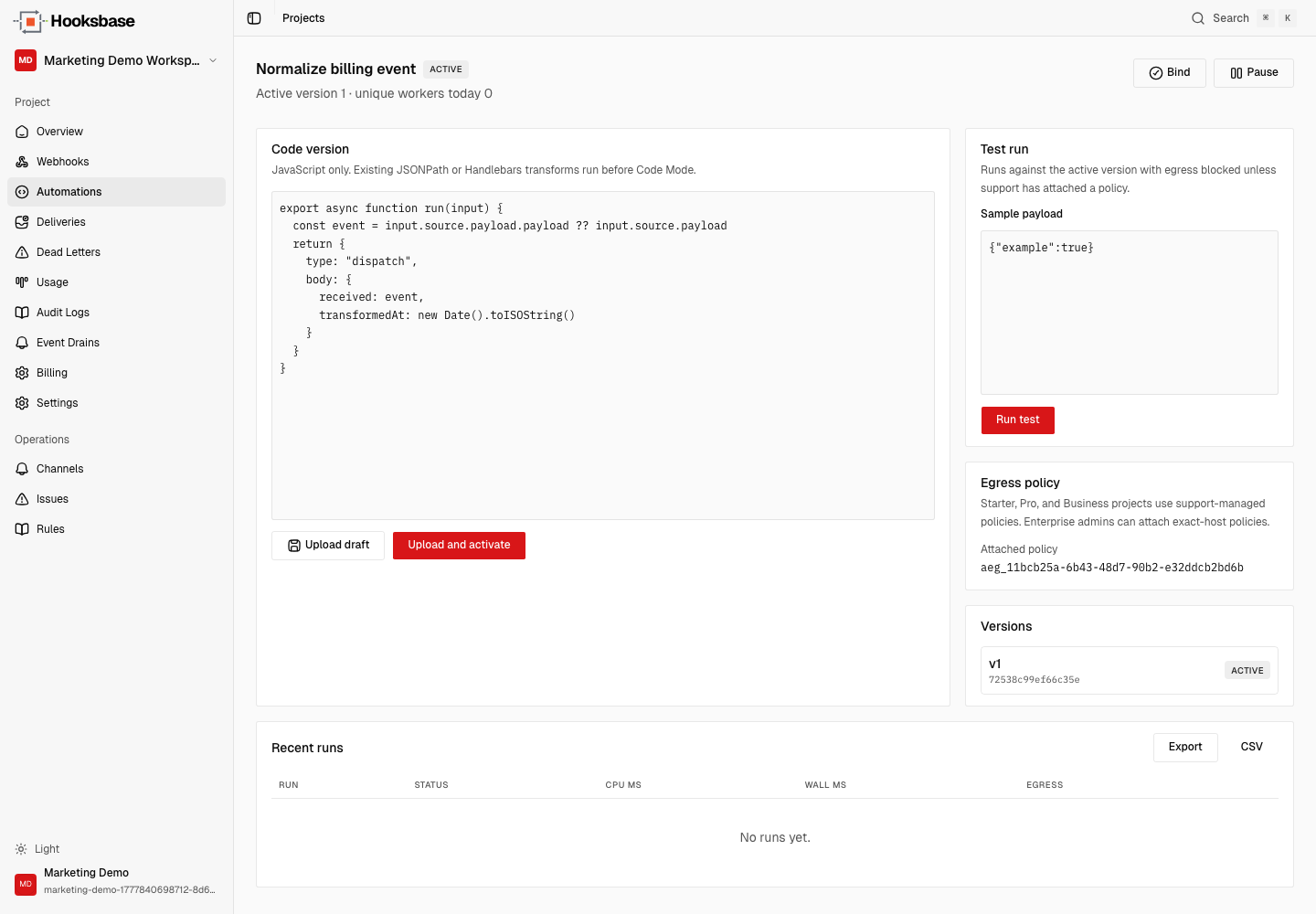
Hooksbase Automations put that logic in the event path. Code Mode is the first automation mode: versioned JavaScript that runs after routing and before the dispatch snapshot is saved.
When to use Automations
Use Automations when the event needs more than a JSONPath extraction or Handlebars template:
- normalize events from multiple providers into one agent input shape
- redact secrets, tokens, emails, or internal fields before model context
- add derived fields such as
tenant,workflow, orpriority - test a transform with sample payloads before binding it to a webhook
- export run history for review or incident debugging
Keep classic payload transforms for small JSON reshapes. Use Automations when the transform is core business logic.
The event path
The delivery path is deliberately ordered:
- Hooksbase accepts and verifies the event.
- Routing picks the destination from the original source payload.
- Automations run Code Mode logic.
- Hooksbase stores the transformed dispatch snapshot.
- Your agent receives that snapshot.
Retries, replay, DLQ re-drive, and bulk replay use the saved dispatch snapshot. They do not re-run the latest active Automation version.
Create the Automation
Create the automation shell and upload the first version:
hooksbase automations create \
  --webhook wh_123 \
  --name "Normalize agent event" \
  --json

hooksbase automations versions create auto_123 \
  --file ./transform.js \
  --activate \
  --json
Example transform.js:
export async function run(input) {
  const source = input.source.payload
  const payload = source.payload ?? source

  return {
    type: 'dispatch',
    body: {
      id: payload.id ?? input.deliveryId,
      type: payload.type ?? source.provider?.eventType,
      tenant: source.webhook?.name,
      data: payload.data ?? payload,
    },
  }
}
Test before binding
Run the Automation against a sample payload:
hooksbase automations test auto_123 \
  --payload ./sample-event.json \
  --json
Inspect the run, logs, and egress attempts:
hooksbase automations runs get run_123 --json
hooksbase automations logs run_123 --json
hooksbase automations runs egress-events run_123 --json
Bind to the webhook
Once the output shape is correct, bind it:
hooksbase automations bind wh_123 auto_123 --json
The next accepted events use the active Automation version. Older deliveries keep their saved dispatch snapshots.
Enterprise egress
Default Automation egress is blocked. Starter, Pro, and Business can run Automations with default egress blocked unless Hooksbase support attaches a policy. Enterprise projects can self-manage exact-host egress policies and gateway credentials:
hooksbase automations egress create --file ./egress-policy.json --json
hooksbase automations egress credentials create pol_123 \
  --name "CRM token" \
  --host api.example.com \
  --secret-file ./secret.txt \
  --json
hooksbase automations egress attach auto_123 pol_123 --json
What next
- Automations feature page
- Automations docs
- Route events to the right agent
- Recover failed agent events
Frequently asked questions
When should you use an Automation instead of a payload transform?
Use a classic payload transform for small JSON reshapes. Reach for an Automation when the event needs real logic: normalising several providers into one agent input shape, redacting secrets or personal data before it reaches model context, adding derived fields such as tenant or priority, or testing against sample payloads before binding it to a webhook.
Where in the event path does an Automation run?
After routing and before the dispatch snapshot is saved. That means routing decisions are made on the source payload, the Automation reshapes what the agent will actually receive, and the result is what gets persisted for replay.
Can an Automation make outbound network calls?
Not by default — egress is blocked. Starter, Pro, and Business run Automations with default egress blocked unless support attaches a policy. Enterprise projects can self-manage exact-host egress policies and gateway credentials.
What is Hooksbase?
Hooksbase is event infrastructure for AI agents. It ingests events over four channels — HTTP, email, HTML form, and scheduled cron — verifies them, routes them by rule, runs versioned Automations in the event path, and delivers them to HTTP and cloud destinations (AWS SQS, AWS EventBridge, GCP Pub/Sub, and S3-compatible storage) with retries, strict ordering, Standard Webhooks-compatible signing, deterministic replay, and a dead-letter path. It is a hosted service, runs on Cloudflare Workers, is operated at hooksbase.com, and is not affiliated with — and shares no code or ownership with — other similarly named webhook, hook, or tunnelling tools.