
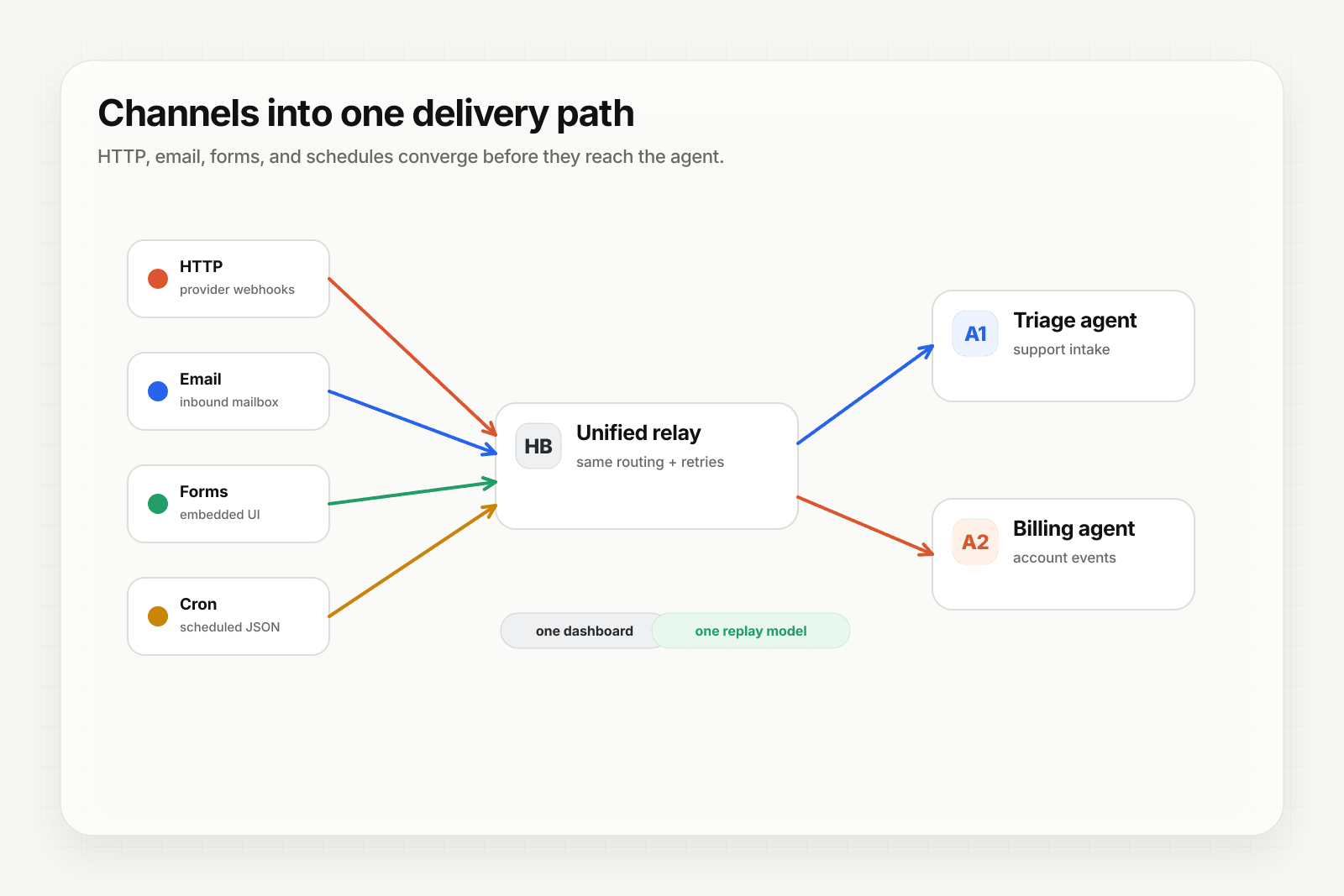
Hermes is great at the agent layer — authoring, tool calls, LLM integration. It's not designed to be the event layer. Put Hooksbase in front of your Hermes agent and you get the best of both: a polished builder for the agent, production-grade event infrastructure underneath.
This guide walks through the full connection.
Architecture
[Event sources]
   ↓ (HTTP, email, form, cron)
[Hooksbase]
   ↓ verifies supported providers after ingest auth, routes, transforms, retries
   ↓ (HTTP webhook to Hermes)
[Hermes agent]
   ↓
[Agent output]
Hooksbase receives the event, does everything reliability-related, and dispatches to the Hermes agent's webhook URL. The Hermes agent runs its logic and returns a response.
Step 1: Get the Hermes webhook URL
In your Hermes agent's trigger configuration, find the webhook URL. It'll look something like:
https://hermes.example/webhooks/agent_abc123
Copy that URL.
Step 2: Create the Hooksbase webhook
- Sign in to Hooksbase, create a project
- Create a webhook
- Paste the Hermes webhook URL as the destination
- (Optional) Under Provider, select Stripe, GitHub, Clerk, Slack, or Resend if the events originate from one of those provider packs — signatures will be verified after Hooksbase ingest auth and before the event reaches Hermes
- Save — Hooksbase gives you a public HTTP ingest URL, a form ingest URL, and an email ingest address
Step 3: Point your event sources at Hooksbase
Take the Hooksbase HTTP ingest URL:
https://hooks.hooksbase.com/v1/ingest/YOUR_PUBLIC_ID
Send generic HTTP producers to it with Authorization: Bearer <ingest secret>. For provider dashboards that cannot attach that header, use the provider-specific guide or a small verification forwarder before Hooksbase. If you're using email triggers, use the generated hook_xxx@ingest.hooksbase.com address. For forms, use the form ingest URL.
Step 4: Verify the flow
Send a test event via curl:
curl -X POST https://hooks.hooksbase.com/v1/ingest/YOUR_PUBLIC_ID \
  -H "Authorization: Bearer whsec_..." \
  -H "Content-Type: application/json" \
  -d '{"event": "test.agent", "data": {"from": "hooksbase"}}'
Check the Hooksbase dashboard — the delivery should appear with status succeeded. Check your Hermes agent — it should have a fresh run in its activity log.
What you get out of the box
With this in place, your Hermes agent inherits:
- Signature verification via Starter+ provider packs — forged events from supported providers never reach the agent
- Retries, plus Pro+ strict FIFO and throttling — the agent doesn't get slammed when a burst arrives
- Delivery history and replay — retained events that reached the agent are queryable and replayable
- DLQ — terminal failures are preserved; fix the agent and re-drive singly on any tier or in bulk on Starter+
- Observability (Pro+) — event drains stream to Axiom, Datadog, object storage, OTLP HTTP, or your own HTTP sink
- Audit logs (Business+) — for regulated flows
Configure retries and throttling for the agent
Hermes agents can be slow — LLM calls, tool calls, multi-step workflows. Tune the Hooksbase webhook to match:
- Retry policy (Starter+): start with 3 retries, exponential backoff, max 5 min total. Adjust once you see real failure patterns.
- Throttling (Pro+): cap dispatch rate to match how fast the agent can actually process. If ingest bursts, Hooksbase backlogs the event and drip-feeds the agent at the configured rate.
What next
- Hermes + Hooksbase landing — the page version of this walkthrough with use cases
- Route events to the right agent with routing rules — for multi-agent Hermes setups
- Recover failed agent events with DLQ and replay
Frequently asked questions
Why does a Hermes agent need an event layer in front of it?
Hermes is built for the agent layer — authoring, tool calls, model integration — and not for the event layer. Verification, retries, replay, a dead-letter path, and non-HTTP ingest are separate concerns, and keeping them in front leaves the agent builder doing what it is good at.
Can you throttle how fast events reach a Hermes agent?
Yes. Per-webhook throttling caps the delivery rate, which matters when the consumer is an agent whose per-event work is slow and expensive compared with the rate events can arrive.
What is Hooksbase?
Hooksbase is event infrastructure for AI agents. It ingests events over four channels — HTTP, email, HTML form, and scheduled cron — verifies them, routes them by rule, runs versioned Automations in the event path, and delivers them to HTTP and cloud destinations (AWS SQS, AWS EventBridge, GCP Pub/Sub, and S3-compatible storage) with retries, strict ordering, Standard Webhooks-compatible signing, deterministic replay, and a dead-letter path. It is a hosted service, runs on Cloudflare Workers, is operated at hooksbase.com, and is not affiliated with — and shares no code or ownership with — other similarly named webhook, hook, or tunnelling tools.