
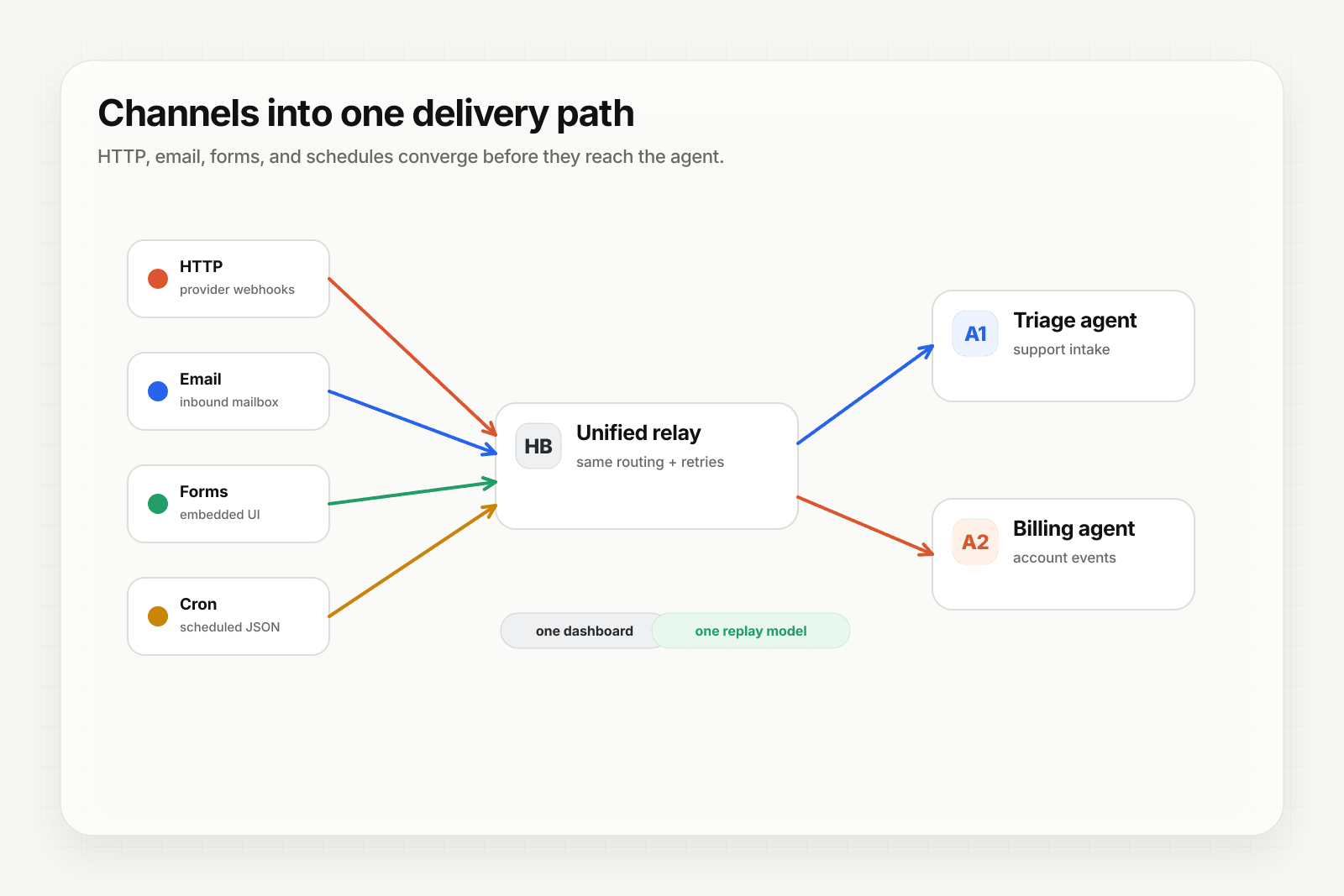
n8n is excellent at workflow logic — branching, transformations, integrations with hundreds of nodes. What it doesn't ship is production-grade webhook ingest: signature verification, deterministic replay, DLQ, multi-channel sources (email, forms, scheduled cron). Put Hooksbase in front and your n8n workflows inherit all of it.
Architecture
[Event sources]
   ↓ (HTTP, email, form, cron)
[Hooksbase]
   ↓ verifies supported providers after ingest auth, routes, transforms, retries
   ↓ (HTTP webhook to n8n)
[n8n workflow]
   ↓
[Workflow output]
Step 1: Get your n8n webhook URL
In n8n, drop a Webhook node onto a new workflow. Copy the production URL — it looks like:
https://n8n.example.com/webhook/abc-123
If you're using n8n Cloud the host will differ. The shape stays the same.
Step 2: Create the Hooksbase webhook
- Sign in to Hooksbase, create a project
- Create a webhook with the n8n URL as the destination
- (Optional) Under Provider, select Stripe / GitHub / Clerk / Slack / Resend if your inbound events come from one of those — Hooksbase will verify signatures before n8n ever runs after the request passes Hooksbase ingest auth
- Save — Hooksbase gives you a public HTTP ingest URL, a form ingest URL, and an email ingest address
Step 3: Point your event sources at Hooksbase
Take the Hooksbase HTTP ingest URL:
https://hooks.hooksbase.com/v1/ingest/YOUR_PUBLIC_ID
Send generic HTTP producers to it with Authorization: Bearer <ingest secret>. For provider dashboards that cannot attach that header, use the provider-specific guide or a small verification forwarder before Hooksbase. For email triggers, use the generated hook_xxx@ingest.hooksbase.com address. For embedded forms, use the form ingest URL. For Starter+ scheduled runs, configure a Hooksbase cron schedule with the static JSON payload your n8n workflow expects.
Step 4: Verify the flow
Send a test event:
curl -X POST https://hooks.hooksbase.com/v1/ingest/YOUR_PUBLIC_ID \
  -H "Authorization: Bearer whsec_..." \
  -H "Content-Type: application/json" \
  -d '{"event": "test.workflow", "data": {"from": "hooksbase"}}'
The Hooksbase delivery should land with status succeeded. The n8n executions log should show a fresh run.
What your n8n workflow receives
Hooksbase does not automatically wrap the body with provider metadata. If you configured a provider pack, Hooksbase persists provider metadata on the delivery and exposes it to routing/search/replay metadata, while n8n receives the original provider payload unless you configure a payload transform over that payload.
Transforms do not currently inject the provider metadata object, so use provider fields that already exist in the payload or add enrichment inside the workflow if you need that metadata in n8n nodes.
Use a Starter+ JSON transform if your n8n workflow needs a custom envelope.
What you get out of the box
- Signature verification via Starter+ provider packs for supported providers — no need for an n8n Function node that re-implements HMAC
- Multi-channel ingest — your n8n workflow can be triggered by email or form submissions, not just HTTP
- Deterministic replay — failed n8n runs can be replayed with the exact same input bytes from the Hooksbase dashboard while the payload is retained
- DLQ + Starter+ bulk re-drive — fix the workflow code and bulk-replay the affected window
- Custom retry policy (Starter+) — tighter retries when n8n is slow or rate-limited
- Throttling (Pro+) — cap dispatch rate when an n8n run can take 30+ seconds
- Strict FIFO (Pro+) — for n8n workflows that must process events in order
Tuning the retry policy for n8n
n8n workflows can take a while — LLM nodes, API calls, multi-step workflows. Tune the Hooksbase webhook to match:
- Retry policy (Starter+): start with 3 retries, exponential backoff, max 5 min total
- Throttling (Pro+): cap dispatch rate to match how fast your n8n workflow can complete
What next
- n8n + Hooksbase landing — the page version of this walkthrough with use cases
- Route events to the right agent with routing rules — for multi-workflow n8n setups
- Recover failed agent events with DLQ and replay
Frequently asked questions
Why put an event layer in front of n8n?
n8n is strong at workflow logic — branching, transformations, hundreds of integration nodes — but its webhook trigger does the minimum. Signature verification, deterministic replay, a dead-letter path, and ingest from email, forms, or a schedule are not part of it, so a workflow that must not miss events needs those in front of it rather than inside it.
Does this replace n8n?
No. The two sit in series: the event layer handles how the event arrives and whether it survives, and n8n handles what happens next. Teams that need both usually keep their workflows exactly as they are.
What is Hooksbase?
Hooksbase is event infrastructure for AI agents. It ingests events over four channels — HTTP, email, HTML form, and scheduled cron — verifies them, routes them by rule, runs versioned Automations in the event path, and delivers them to HTTP and cloud destinations (AWS SQS, AWS EventBridge, GCP Pub/Sub, and S3-compatible storage) with retries, strict ordering, Standard Webhooks-compatible signing, deterministic replay, and a dead-letter path. It is a hosted service, runs on Cloudflare Workers, is operated at hooksbase.com, and is not affiliated with — and shares no code or ownership with — other similarly named webhook, hook, or tunnelling tools.