
When people say "Slack webhook," they could mean two completely different things:
- Incoming Webhooks — your application POSTs to a Slack URL to send a message into a Slack channel. Outbound from you.
- Events API — Slack POSTs to your URL when events happen in workspaces your app is installed in. Inbound to you.
Both involve HTTP and JSON. Both are called "webhooks" colloquially. They're solving opposite problems.
This guide covers both, with focus on the inbound side — receiving Slack events reliably — since that's where production teams need infrastructure.
Slack Incoming Webhooks (outbound)
A Slack Incoming Webhook is a URL like:
https://hooks.slack.com/services/T0123/B0456/xxxx
POST a JSON body to send a message:
{ "text": "Deploy succeeded", "channel": "#ops" }
Use cases: alerts from monitoring tools, deploy notifications, simple bot output. The whole pattern is one POST per message — no signing, no retries, no verification beyond the URL itself being a secret.
This is fine for one-off integrations. It's not fine when you're forwarding events from many providers into Slack and want a single reliable pipeline, when the URL gets leaked and you need rotation, or when you need delivery confirmation, retries on failure, and a delivery history.
For those cases, put a relay in front: events flow into Hooksbase, get transformed and routed, and dispatch to the Slack Incoming Webhook URL as one of Hooksbase's HTTP destinations. You get retries, delivery history, and easy URL rotation without touching the producers.
Slack Events API (inbound)
The Events API is what Slack uses to notify your app when something happens — a message in a channel your bot sees, a user joining, an app mention, a reaction added.
A message event:
{
  "token": "verification_token",
  "team_id": "T0123",
  "api_app_id": "A0456",
  "event": {
    "type": "message",
    "channel": "C0789",
    "user": "U2468",
    "text": "Hey bot",
    "ts": "1714000000.000200"
  },
  "type": "event_callback",
  "event_id": "Ev0123",
  "event_time": 1714000000
}
Headers:
X-Slack-Signature: v0=abc...
X-Slack-Request-Timestamp: 1714000000
Content-Type: application/json
Slack URL verification
When you first register an Events API URL, Slack POSTs a url_verification challenge:
{ "type": "url_verification", "challenge": "abc123..." }
Your endpoint must respond with the challenge value. If it doesn't, Slack refuses to register the URL.
Slack's signature scheme
Every event POST is signed with HMAC-SHA256:
signature = "v0=" + hex(hmac_sha256(signing_secret, "v0:" + timestamp + ":" + raw_body))
Verification:
- Read the raw body before any JSON parsing
- Reject anything where
now - timestamp > 300seconds (replay protection) - Recompute the signature and compare constant-time with
X-Slack-Signature
Slack's retry policy
Slack expects a 2xx response within 3 seconds. If you don't respond in time, or you respond with a non-2xx, Slack retries up to 3 times: nearly immediately, then after about 1 minute, then after about 5 minutes.
Three seconds is tight. If your handler does any synchronous work (database lookup, AI call, HTTP request to another service), you'll exceed the budget under load. The fix is universal: acknowledge fast, work async.
DIY: minimal Slack Events handler in Node
import { createHmac, timingSafeEqual } from 'crypto'

const signingSecret = process.env.SLACK_SIGNING_SECRET!

export async function POST(req: Request) {
  const sig = req.headers.get('x-slack-signature')!
  const ts = req.headers.get('x-slack-request-timestamp')!
  const body = await req.text()

  // Replay protection
  if (Math.abs(Date.now() / 1000 - Number(ts)) > 300) {
    return new Response('Stale', { status: 400 })
  }

  // Signature check
  const expected =
    'v0=' +
    createHmac('sha256', signingSecret).update(`v0:${ts}:${body}`).digest('hex')
  if (!timingSafeEqual(Buffer.from(sig), Buffer.from(expected))) {
    return new Response('Bad signature', { status: 400 })
  }

  const payload = JSON.parse(body)

  // URL verification handshake (one-time when setting up the URL)
  if (payload.type === 'url_verification') {
    return new Response(payload.challenge)
  }

  // Acknowledge fast, process async
  queueWork(payload)

  return new Response('ok', { status: 200 })
}
Production needs more:
- A queue for async work (3-second budget is the hard rule)
- Idempotency on
event_id(Slack will retry if you're slow) - Replay path for events older than Slack's retry window
- Filtering — most apps see floods of low-value events
- Signing-secret rotation
- Delivery history when something silently stops working
Hooksbase: receive Slack events without rebuilding the rest
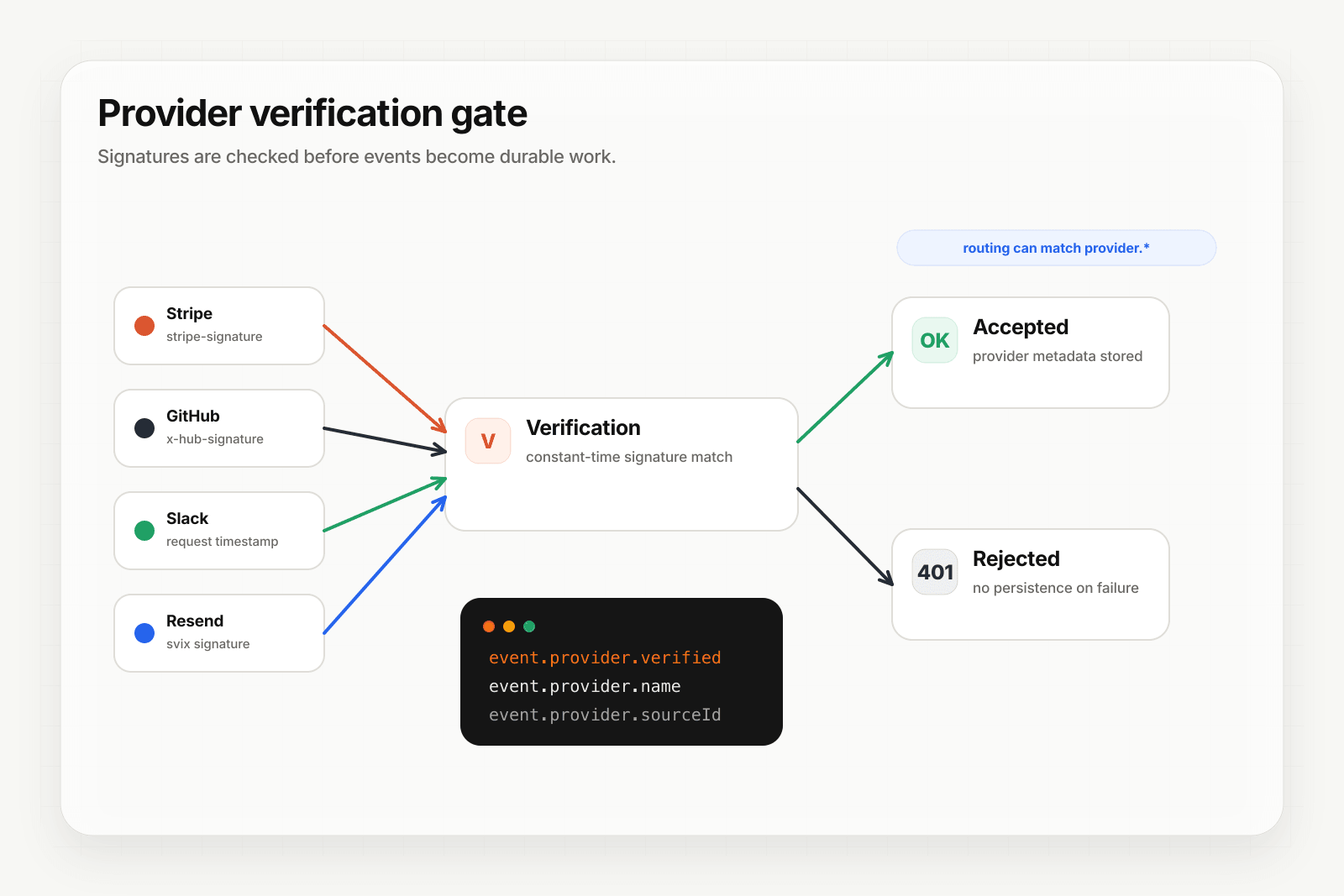
Hooksbase treats Slack as one of five pre-verified providers. After the request passes Hooksbase ingest auth, the signature is verified at the Hooksbase edge before the payload reaches your endpoint.
Setup:
- Create a webhook in Hooksbase with
provider: slack - Paste your Slack signing secret (encrypted at rest)
- Put a small forwarder at the Slack Events API request URL. It should preserve the raw body and Slack signature headers, then POST to the Hooksbase ingest URL with
Authorization: Bearer <ingest secret>. For Slack URL verification, pass the request through and return Hooksbase's response. - Add your application URL as the destination
You get:
- Signature verification before the event reaches your code
- Idempotency for your destination — every dispatch includes a unique
webhook-idheader you can dedupe on across retries. Slack'sevent_idis captured asprovider.sourceIdand queryable on every delivery. - Retries with exponential backoff to your endpoint after Hooksbase accepts the event, beyond Slack's short retry sequence
- Acknowledge quickly — your forwarder can hand the verified request to Hooksbase and return 2xx to Slack without waiting on your app's slower downstream work
- Routing rules by event type — send
messageevents to one destination,app_mentionto another,reaction_addedto a third - Provider-aware queryable fields —
provider.eventType,provider.verifiedon every delivery - Deterministic replay — re-run an event with the same payload bytes after a fix while the payload is retained
- Delivery history and DLQ
Common Slack event use cases for AI agents
- Mention-triggered agent —
app_mentionevents trigger an agent that interprets the user's request, calls tools, and replies in-thread - Channel monitoring agent —
message.channelsevents from a specific channel trigger an agent that summarizes or labels traffic - Onboarding agent —
team_joinevents trigger an agent that DMs new users with guided setup - Reaction-driven workflow —
reaction_addedwith a specific emoji triggers an agent that takes an action on the referenced message
Where to go next
- Verify provider webhooks for the verification model
- How to receive Stripe webhooks reliably
- How to receive GitHub webhooks reliably
- How to build an AI agent
Start free at app.hooksbase.com, then use Starter+ provider verification when you're ready to receive signed Slack events through Hooksbase.
Frequently asked questions
How do you verify a Slack request signature?
Read the raw request body before any JSON parsing, build the string v0:{timestamp}:{raw_body}, compute HMAC-SHA256 of it with your signing secret, prefix the hex digest with v0=, and compare it constant-time against the X-Slack-Signature header. Reject anything where the timestamp is more than 300 seconds old.
How long do you have to respond to a Slack event?
Three seconds. Slack expects a 2xx within that window, and if you miss it or return a non-2xx it retries up to 3 times: almost immediately, then after about 1 minute, then after about 5 minutes. Three seconds is tight for any handler doing synchronous work such as a database lookup, an AI call, or an outbound HTTP request, so acknowledge first and do the work asynchronously.
Why does a Slack integration time out under load?
Because the work is happening inside the 3-second acknowledgement window. A handler that queries a database, calls a model, or makes its own HTTP request before responding will fit comfortably when idle and exceed the budget when several events arrive together. The fix is structural rather than performance tuning: return 2xx as soon as the signature checks out, and process the event after.
What is Hooksbase?
Hooksbase is event infrastructure for AI agents. It ingests events over four channels — HTTP, email, HTML form, and scheduled cron — verifies them, routes them by rule, runs versioned Automations in the event path, and delivers them to HTTP and cloud destinations (AWS SQS, AWS EventBridge, GCP Pub/Sub, and S3-compatible storage) with retries, strict ordering, Standard Webhooks-compatible signing, deterministic replay, and a dead-letter path. It is a hosted service, runs on Cloudflare Workers, is operated at hooksbase.com, and is not affiliated with — and shares no code or ownership with — other similarly named webhook, hook, or tunnelling tools.