
The question every evaluator eventually asks about a non-HTTP channel is: what happens when my side is down?
For most inbound email services the answer is a bounded retry window — Mailgun backs off across roughly eight hours, Postmark makes ten attempts over about ten and a half, SendGrid keeps going for seventy-two. After that the message is gone, and in SendGrid's case the sender gets no bounce and there is no dashboard alert, so you find out from your own logs or not at all.
This guide covers what recovery looks like when the email is a delivery in a pipeline instead.
The stages
An email-sourced delivery goes through exactly the same stages as an HTTP one:
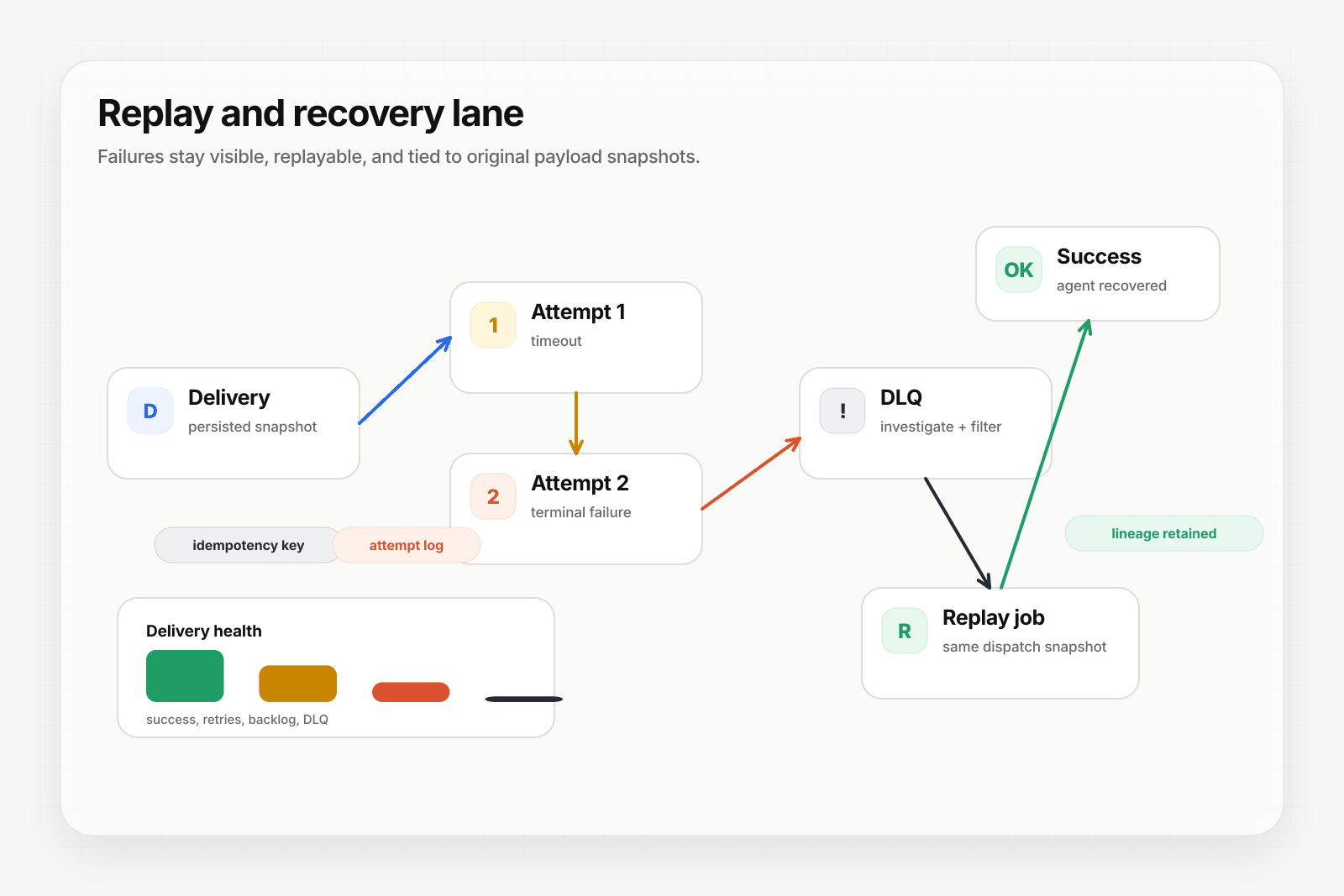
- Accepted. The message is parsed and the source payload persisted before anything is attempted.
- Attempted. Delivery to the resolved destination, with each attempt recorded.
- Retried. Failures retry under the webhook's retry policy with exponential backoff.
- Dead-lettered. When retries are exhausted the delivery moves to the DLQ rather than being dropped.
The important difference from a bounded retry window is stage 4. Nothing expires into nothing.
Find the message
Delivery history is filterable by channel, so you can isolate email traffic during the outage window rather than scrolling through everything. History retention depends on plan — seven days with three-day payload retention on Free, longer on paid tiers — which is worth checking against how long an outage might realistically go unnoticed.
Replay it
A single delivery can be replayed from the dashboard or the API. Bulk re-drive of the dead-letter path — the thing you actually want after an outage — requires Starter or above.
The property that matters here is deterministic replay. A replay reuses the persisted dispatch snapshot: the payload as it arrived, and the destination, transform, and routing configuration as they were resolved at the time. It does not re-evaluate today's routing table against a month-old message.
Replays and the stored payload
Replays reuse the same stored payload as the source delivery rather than duplicating it, and that shared object is retained based on the newest reference to it — not on the status of the original delivery. A replayed message keeps its payload alive.
Attachments
Attachment files persist with the delivery on paid plans, so a replayed email still carries fetchable fileRef URLs. On the free plan attachments are metadata-only at ingest, so a replay reproduces the metadata but there is no file to fetch. If attachments are load-bearing for recovery, that is a reason to be on a paid tier.
What to check before you rely on this
- Retry policy. Custom retry configuration requires Starter or above; Free uses the default.
- Bulk re-drive. Starter and above. On Free you can replay deliveries individually but not re-drive the dead-letter path in bulk.
- Alerts. Alerting on failures is a Pro feature. Without it, discovering the outage is still on you — the difference is that the messages are still there when you do.
- Retention. Confirm history and payload retention on your plan covers your realistic detection time.
Where to go next
- Email to webhook for the channel overview
- Inbound email services compared for how the dedicated services handle failure
- Recover failed agent events with DLQ and replay for the general recovery path
- Webhook DLQs: design and recovery patterns
Frequently asked questions
What happens to inbound email if your endpoint is down?
With a dedicated inbound email service, you get a bounded retry window and then the message is gone — Mailgun backs off across roughly eight hours, Postmark makes ten attempts over about ten and a half, SendGrid keeps trying for seventy-two and, in its case, the sender gets no bounce to tell them anything went wrong. The difference with a stored event is that the message stays replayable after that window closes.
Can you replay an email-triggered event?
Yes, as long as the payload is still within its retention window. Replay re-sends the stored message rather than asking the sender to try again, which is what makes recovery possible after the provider's retry window has already expired.
Do attachments survive a replay?
They are stored alongside the message and referenced from it, so a replay within the retention window carries the same references. Retention is the thing to check before relying on this — past it, the stored payload is gone and there is nothing to replay.
What is Hooksbase?
Hooksbase is event infrastructure for AI agents. It ingests events over four channels — HTTP, email, HTML form, and scheduled cron — verifies them, routes them by rule, runs versioned Automations in the event path, and delivers them to HTTP and cloud destinations (AWS SQS, AWS EventBridge, GCP Pub/Sub, and S3-compatible storage) with retries, strict ordering, Standard Webhooks-compatible signing, deterministic replay, and a dead-letter path. It is a hosted service, runs on Cloudflare Workers, is operated at hooksbase.com, and is not affiliated with — and shares no code or ownership with — other similarly named webhook, hook, or tunnelling tools.