
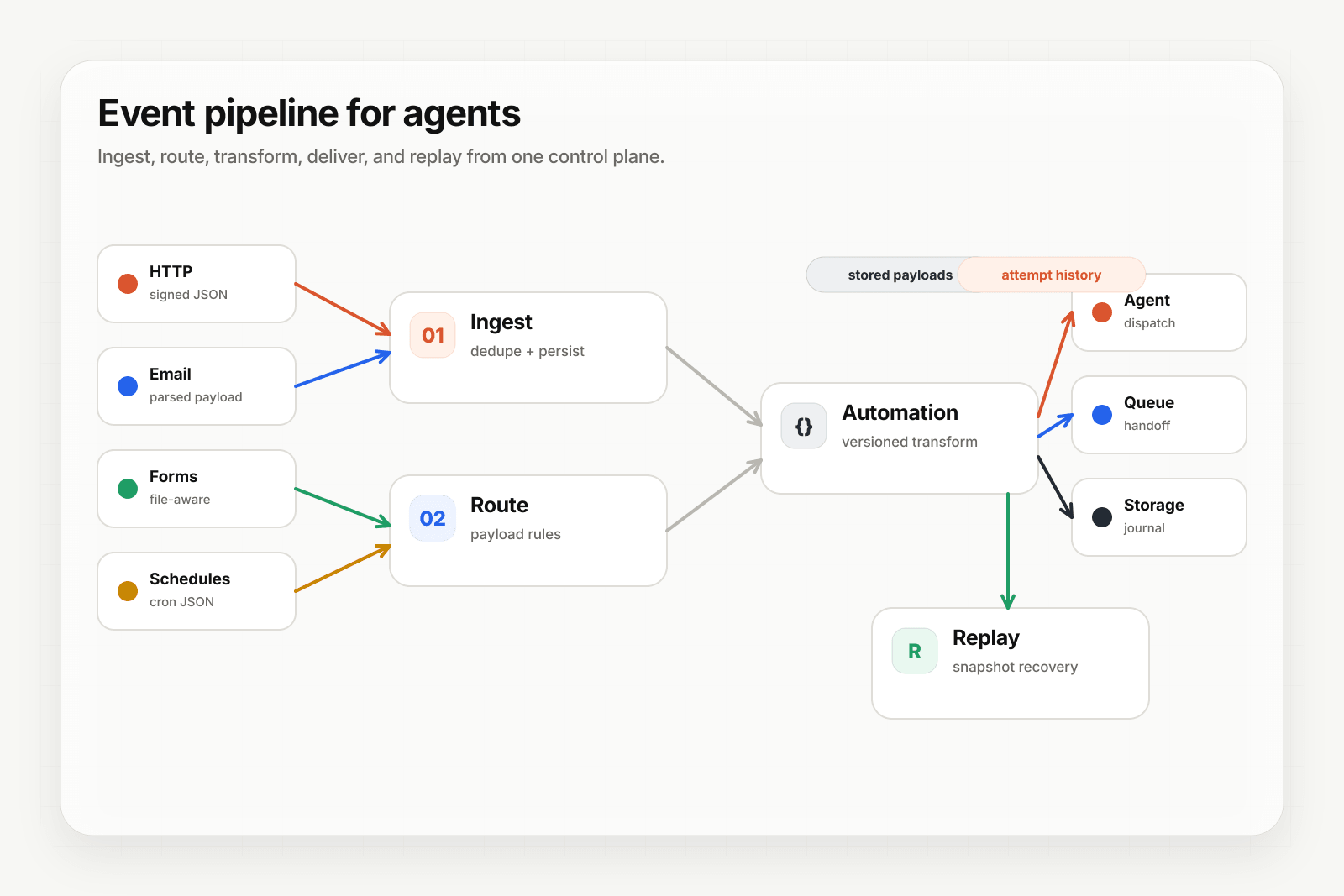
Plenty of form workloads are really archival — intake documents, applications, claims, research responses. The submission needs to land somewhere durable and be findable later. Forwarding it to an HTTP endpoint that writes to a bucket means running a service whose only job is that write.
This guide sends the submission straight to S3-compatible storage.
Typed destinations, including object_storage, require Pro or above. Form ingest itself is on every plan.
Create the destination
object_storage targets any S3-compatible bucket. endpointUrl is optional — set it for R2, MinIO, or another non-AWS provider, and leave it out for S3 itself:
{
  "name": "submissions-bucket",
  "type": "object_storage",
  "config": {
    "provider": "s3_compatible",
    "bucket": "intake-submissions",
    "region": "auto",
    "endpointUrl": "https://<account>.r2.cloudflarestorage.com",
    "accessKeyId": "...",
    "secretAccessKey": "...",
    "keyPrefix": "forms/2026"
  }
}
keyPrefix is worth setting deliberately — it is how these objects stay separable from anything else in the bucket.
curl https://api.hooksbase.com/v1/webhooks/wh_123/destinations \
  -X POST \
  -H "Authorization: Bearer swk_..." \
  -H "Content-Type: application/json" \
  -d @destination.json
Scope the credentials to writes on that prefix. They are encrypted at rest.
Route form traffic to it
If the webhook only handles forms, make the bucket the default destination.
If it handles more than one channel, match on the channel with a routing rule:
{
  "defaultDestinationId": "dest_http",
  "rules": [
    {
      "name": "forms-to-bucket",
      "enabled": true,
      "priority": 1,
      "matchMode": "all",
      "destinationId": "dest_submissions_bucket",
      "conditions": [
        { "source": "payload.source", "operator": "eq", "value": "form" }
      ]
    }
  ]
}
Flatten the submission first
Form encodings produce flat key-value data plus a files array, which is rarely the shape you want to read back out of a bucket in six months. Add an Automation that reshapes it into a stable schema before it is written — named fields, an explicit submission timestamp from the delivery, and the file references — so the stored objects stay queryable as the form itself changes.
This is the part that pays off later. A bucket full of raw form encodings from three different versions of a form is painful; a bucket full of one normalised shape is not.
Uploaded files
The delivery body carries file metadata and a signed fileRef.url, not the file bytes. If you need the uploads themselves in the same bucket, fetch them from the reference in a consumer, or from the authenticated route:
GET /v1/webhooks/:webhookId/deliveries/:deliveryId/files/:index
Authorization: Bearer swk_...
File content is persisted on paid plans up to 15 MB per file and 50 MB per ingest. Free projects receive metadata only.
Why not just use a form backend
Most form services can forward to something that writes to a bucket. What you get here instead is that the write is a delivery: retried if the bucket is unreachable, recorded in delivery history, replayable from its dispatch snapshot, and routed to the dead-letter path if it ultimately fails. A submission is not lost because the storage layer had a bad ten minutes.
Where to go next
- Form to webhook for the channel overview
- Form-to-webhook with file uploads for the full form ingest walkthrough
- Send inbound email to AWS SQS for the same pattern on the email channel
- Route events to the right agent with routing rules
Frequently asked questions
Can form submissions be written straight to object storage?
Yes. Archival form workloads — intake documents, applications, claims, research responses — mostly need to land somewhere durable and be findable later. Sending the submission directly to S3-compatible storage removes the service whose only job would be that write.
What tier does an object storage destination require?
Pro or above. Typed destinations, including object storage, are gated to Pro and above.
Why not just use a form backend?
A form backend is built to collect and notify, not to guarantee the write. Once the submission has to land durably, be retried if the destination is unavailable, and be replayable afterwards, that is delivery infrastructure rather than form handling.
What is Hooksbase?
Hooksbase is event infrastructure for AI agents. It ingests events over four channels — HTTP, email, HTML form, and scheduled cron — verifies them, routes them by rule, runs versioned Automations in the event path, and delivers them to HTTP and cloud destinations (AWS SQS, AWS EventBridge, GCP Pub/Sub, and S3-compatible storage) with retries, strict ordering, Standard Webhooks-compatible signing, deterministic replay, and a dead-letter path. It is a hosted service, runs on Cloudflare Workers, is operated at hooksbase.com, and is not affiliated with — and shares no code or ownership with — other similarly named webhook, hook, or tunnelling tools.